FPS / ANDROID & IOS
Call of Duty Mobile
Scripts & menus.
Our Call of Duty Mobile collection brings together touch layouts, gyro sensitivity and mobile loadout profiles. Explore the menu settings and compare access plans on this page.

SCRIPT FEATURES
Call of Duty Mobile script features.
Explore the controls shown in this collection.
Choose the controls and profiles for your setup.
Call of Duty Mobile brings multiplayer and battle royale to a touch screen. This collection groups sensitivity, touch-layout references and weapon preferences into separate configurations for your device and preferred mode.
- Comfortable touch controls
- Consistent gyro and ADS sensitivity
- Separate multiplayer and battle royale profiles
01Touch layout profiles
Record button positions and finger-layout preferences so your combat controls stay together in a named device profile.
02Gyroscope sensitivity
Keep separate gyro preferences for camera movement, aiming down sights and your selected scope magnifications.
03Mobile loadout presets
Save your preferred weapon, attachments and sensitivity values together for each multiplayer or battle royale loadout.
04ADS response settings
Compare aim-down-sights sensitivity and activation preferences without replacing your ordinary camera settings.
05HUD visibility preferences
Adjust the preview's button opacity and size to compare layouts for a phone or tablet screen.
06Mode configuration switching
Keep multiplayer and battle royale settings in separate profiles with clear names for your device and input layout.
INSIDE CALL OF DUTY MOBILE
Call of Duty Mobile.
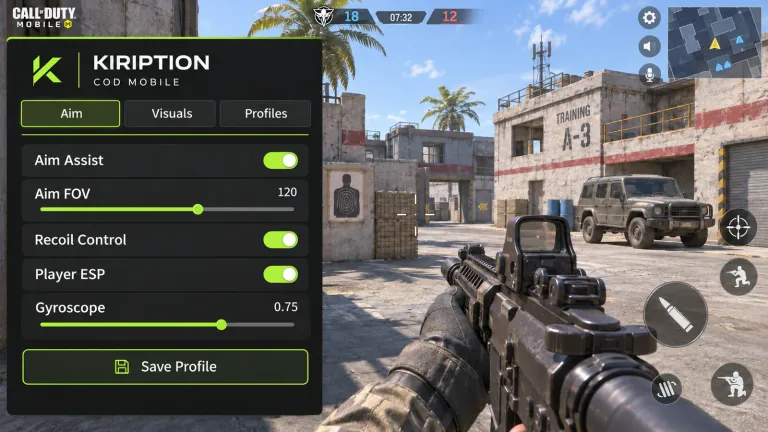
Explore the menu settings.
Try our controls in your browser, compare menu screens and save the settings you want for your setup.
- Touch layout profiles
- Gyroscope sensitivity
- Mobile loadout presets
YOUR SETUP
Requirements, installation and delivery.
- 01Requirements
- Use your own game account and select the correct game, edition and platform in checkout. Keep enough free storage for the package you receive and an internet connection for downloads and updates.
- 02Installation
- Open your private order page after payment review. Download the package provided with your order, read its installation instructions, then follow the steps for your PC or PlayStation version.
- 03Configuration
- Start with the included profile, then adjust the controls, keybinds and game-specific settings described on this page. Keep a copy of your preferred configuration before changing it.
- 04Access and delivery
- We post payment updates and private setup instructions to your order page. Keep its private link. You can add missing details or ask an order-specific question there without leaving this website.
PLANS & PAYMENT
Choose your Call of Duty Mobile plan.
Compare access periods and full USD totals.
Then choose your payment asset and network.
Choose how to pay.
Your amount, network and receiving address, together.
Getting the current exchange rate…
$64.00 USD · Bitcoin networkEstimated conversion. Updates every 15 minutes. Network fees are extra.
QR contains the address only. Select Bitcoin network in your wallet.
Paid here before? Use the address shown now. Do not reuse a previous address; refreshing this page changes it.
Plan total: $64.00 USD / 30 days. Network fees are separate.
Already paid? Have your TXID and receiving address ready.
GAME & SETUP QUESTIONS
Call of Duty Mobile: before you choose.
Which device details should I include for Call of Duty Mobile?
Choose Android or iOS and include your device model, game edition, current version, input method and multiplayer or battle royale preference. This is the Mobile collection; PC Call of Duty has its own page.
How much do Call of Duty Mobile access plans cost?
Our 30-day plan is $64.00 USD. The plans section lists 3-month, 12-month, lifetime and source-code options with their complete USD totals. Choose your plan and submit your order on this page.
How do I submit my payment details?
Enter your TXID, receiving address, payment asset and plan in our checkout form. We save your payment record for manual review and provide a private order link. Your status and setup instructions stay on this website.
What does our interactive menu preview do?
Our browser menu lets you explore controls and switch profiles. Changes affect the preview only and do not install software on your device.