SURVIVAL / PC & PLAYSTATION
Rust
Scripts & menus.
Explore Rust script and menu previews for weapon recoil, attachments and sensitivity profiles. Compare access plans and check the requirements for your PC setup with Kiription support.
SCRIPT FEATURES
Rust script features.
Explore the controls shown in this collection.
Confirm the supplied build with support.
Rust recoil scripts are most useful when the configuration matches the weapon in your hands. The configuration focuses on per-weapon control, attachment adjustments and your own sensitivity, with manual profile switching kept easy to reach.
- Weapon-specific spray control
- Scope and attachment adjustments
- Sensitivity settings that match the game
01Per-weapon recoil patterns
Keep distinct profiles for weapons such as the Assault Rifle, LR-300, MP5 and Thompson, subject to the build's supported list.
02Scope & barrel adjustments
Store separate values for your selected optic and muzzle attachment so a loadout change has its own profile.
03Independent X/Y control
Adjust vertical and horizontal compensation strength separately instead of tying both to one slider.
04Sensitivity & FOV matching
Record your game sensitivity, aiming sensitivity and field of view with the script configuration.
05ADS-only activation
Choose whether the script activates while aiming, with a separate option for hip-fire behavior.
06Weapon switching & quick toggles
Assign weapon-profile keys and an immediate on/off control. Automatic detection is not assumed to be included.
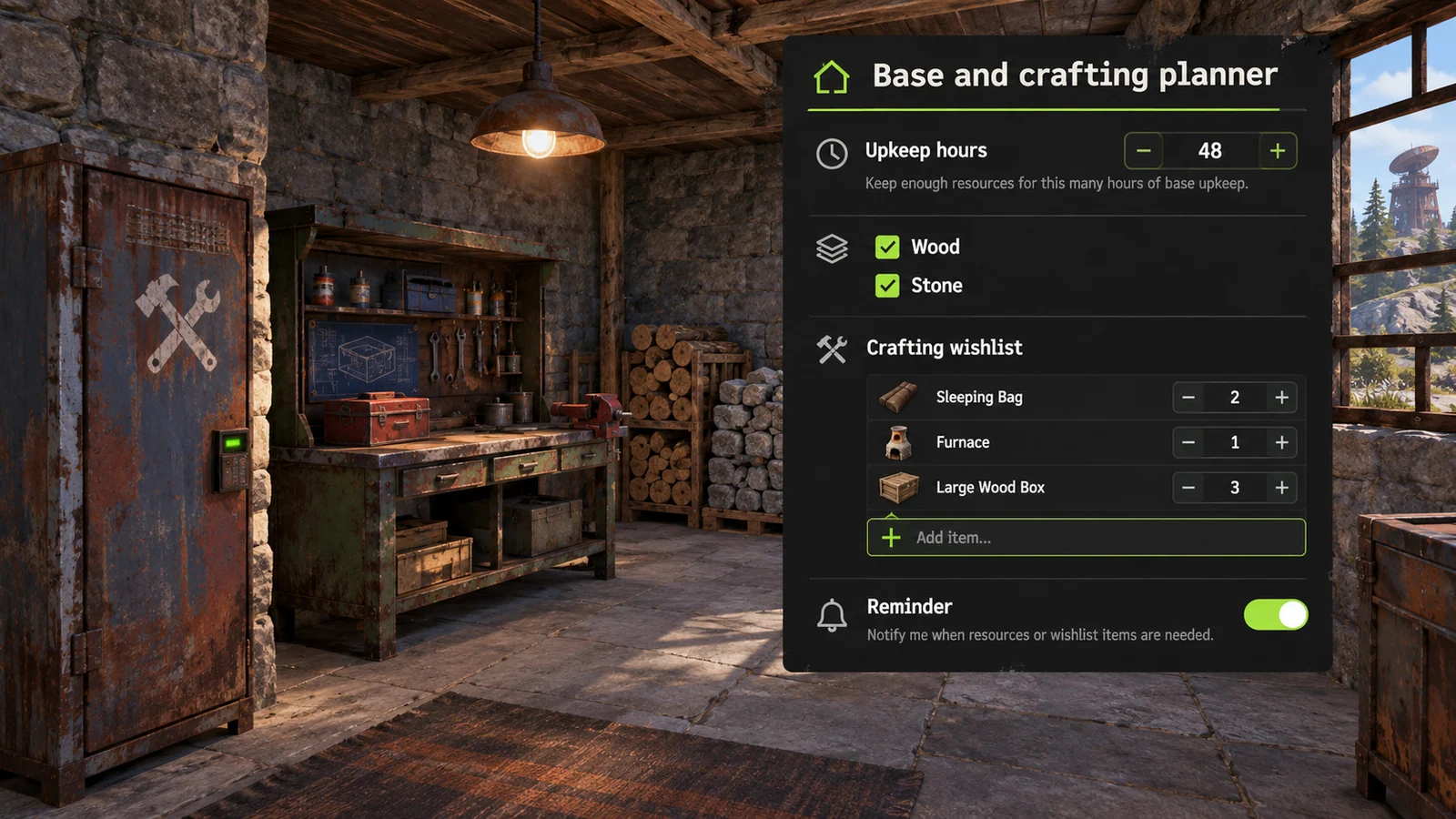
07Base upkeep reminders
Preview a base resource checklist and manually configured upkeep reminder.
08Crafting resource wishlist
Group wood, stone, metal fragments and selected crafting items into a resource wishlist.
09Wipe-specific setup notes
Keep base priorities, crafting goals and weapon preferences together under a named wipe profile.
PC & PLAYSTATION
Rust scripts for PlayStation.
PlayStation cheats and scripts are available without an additional accessory. Share your console model, game edition and current version with support before choosing access.
Private installation and setup instructions are shared through support after purchase. Functions can differ from the PC menu previews on this page.
Check your PlayStation setupINSIDE RUST
Rust.
Explore the menu settings.
Try the controls in your browser, then compare menu screens and game imagery. Ask support which settings are included in the supplied build.
- Per-weapon recoil patterns
- Scope & barrel adjustments
- Independent X/Y control
BEFORE YOU CHOOSE
Check your setup before paying.
- 01Your game version
- Tell support your Rust edition, current build and PC setup. Ask which configurations and functions are included before choosing access.
- 02Your access period
- Compare 30-day, 3-month and 12-month plans. Lifetime access and source-code packages have their own prices and license terms to confirm with support.
- 03Your payment record
- Keep the transaction hash, network, amount and receiving address from your wallet. Send your receipt to the Telegram bot for manual review and setup instructions.
PLANS & PAYMENT
Choose your Rust plan.
Compare access periods and full USD totals.
Then choose your payment asset and network.
Choose how to pay.
Your amount, network and receiving address, together.
Getting the current exchange rate…
$69.00 USD · Bitcoin networkEstimated conversion. Updates every 15 minutes. Network fees are extra.
QR contains the address only. SelectBitcoin networkin your wallet.
Paid here before? Use the address shown now. Do not reuse a previous address; refreshing this page changes it.
Plan total:$69.00 USD / 30 days. Network fees are separate.
Already paid? Have your TXID and receiving address ready.
GAME & SETUP QUESTIONS
Rust: before you choose.
Which details matter for a Rust recoil setup?
Include your weapons, scopes, barrel attachments, sensitivity and field of view. Ask support which profiles are included and whether they match the current Rust patch.
How much do Rust access plans cost?
The 30-day plan is $69.00 USD. The plans section also lists 3-month, 12-month, lifetime and source-code options with their full USD totals. Confirm availability and license terms with support.
How do I send my payment details?
Choose a plan and payment network, then use the receiving address shown in checkout. After paying, send the game, plan, amount, network, receiving address and TXID to @kiriptionbot for manual review.
What does the interactive menu preview do?
You can explore the settings and switch between profiles in your browser. The controls affect this preview only. Ask support to confirm the functions included in the supplied product.
Can I use Rust scripts on PlayStation?
Kiription offers a PlayStation cheat or script for Rust without an additional accessory. Tell support your console model, exact game edition and current version before choosing a plan. Private installation and setup instructions are shared with the buyer through support after purchase. PC menu previews do not describe every console function.